
Why use an antinuke system?
An antinuke system helps protect your server from destructive actions performed by moderators/staff — whether intentionally, accidentally, or through a compromised account. It limits how many high‑impact actions someone can do within a short time window and automatically responds when that limit is exceeded.How does this antinuke work?
This system is event + audit‑log + rate‑limit based.- A server event happens (e.g. channel created, role deleted, member banned).
- The bot reads the Audit Log to determine who performed the action.
- The bot checks if the actor is bypassed (server owner / whitelisted).
- A rate limiter counts how many actions that actor performs within 10 seconds.
- If the actor exceeds the configured threshold, AntiNuke:
- Logs an alert to your configured log channel (if enabled)
- Punishes the actor (
ban,kick, orstripstaff) - Reverts what it can (e.g. deletes newly‑created channels/roles, reverts permission escalation, removes dangerous roles, deletes mention spam)
What it can and cannot revert
Can revert:- Channel creation (deletes the created channel after trigger)
- Role creation (deletes the created role after trigger)
- Dangerous permission escalation on roles (reverts permissions back)
- Dangerous roles granted to members (removes the dangerous roles)
- Mention spam (deletes cached mention messages from the last 10 seconds)
- Webhook abuse (deletes abusive webhooks if it has permission)
- Bot adds (kicks unauthorized bots when triggered)
- Channel deletions (Discord does not provide a true restore)
- Role deletions (same limitation)
Requirements
Bot permissions (important)
AntiNuke relies heavily on audit logs and moderation permissions. Recommended permissions:- View Audit Log (required for most modules to function)
- Ban Members (if you use ban punishment)
- Kick Members (if you use kick punishment)
- Manage Roles (required for stripstaff + reverting perms + removing dangerous roles)
- Manage Channels (required to delete channels it created / clean up)
- Manage Webhooks (required to remove abusive webhooks)
- Read Message History (for mention spam deletion)
- Manage Messages (helps with deleting mention messages)
If your bot does not have a required permission, that module may silently fail to punish/revert.
Quick setup
- Invite the bot with the permissions above.
- Enable Antinuke:
.antinuke on - Set a log channel:
.antinuke logchannel #logs - Add trusted Antinuke admins (optional):
.antinuke admin @user - Configure modules (recommended set below).
- Verify config:
.antinuke configuration
Core commands
Enable AntiNuke (server owner only)

Disable AntiNuke (server owner only)
This disables AntiNuke and resets the stored configuration.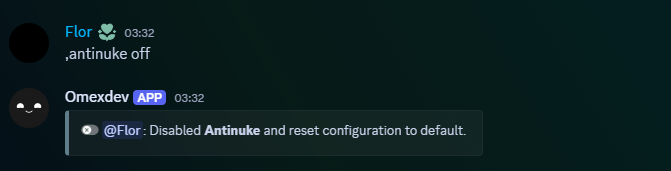
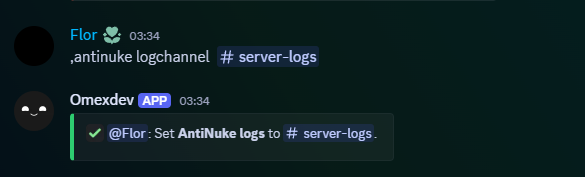
Set the log channel (server owner only)
Disable logging
Admins and bypassing
Allowing other users to configure AntiNuke (server owner only)
The server owner can toggle AntiNuke Admin on a member.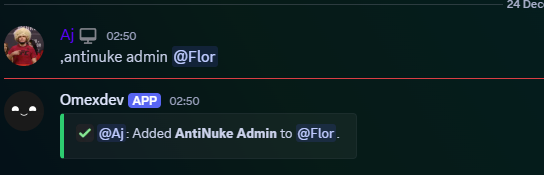
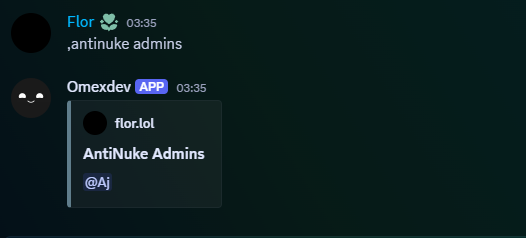
Viewing AntiNuke Admins (server owner only)
Whitelisting (bypass AntiNuke)
Whitelisted users do not trigger antinuke punishments.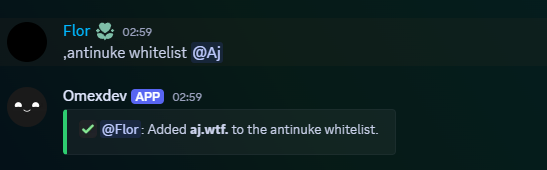
Unwhitelist
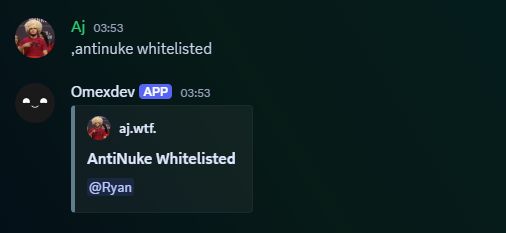
View whitelisted users
Enabling an antinuke module
Modules are configured per feature (ban/kick/channelcreation/etc). Each module is stored with:status(on/off)punishment(ban,kick,stripstaff)threshold(1–12)command(true/false) (stored; triggers are event/audit-log based)
Available Flags
Threshold
Threshold
Number of actions allowed in a 10 second window before AntiNuke triggers.
Recommended:
- 1–2 for destructive actions (deletions, dangerous permissions)
- 2–4 for creation spam (channels/roles)
- 3–5 for mentions
Punishment
Punishment
Action taken against the actor when the module triggers.
Punishments:
bankickstripstaff(removes staff roles the bot is allowed to remove)
Command detection
Command detection
Stored in configuration as
command: true/false.Triggers rely on server events + audit logs, not command parsing.
Keep this enabled for consistency with your config schema.
Modules (exactly matching your bot)
Mass ban
Mass ban
Triggers when bans are detected and attributes the action using audit logs.
Mass kick
Mass kick
Triggers when kicks are detected and attributes the action using audit logs.
Channel creation
Channel creation
If triggered, it punishes the actor and deletes the created channel.
Channel deletion
Channel deletion
Punishes/logs on threshold.
Channel update
Channel update
Watches channel edits (name/permissions/settings) and punishes if abused.
Role creation
Role creation
If triggered, it punishes the actor and deletes the created role.
Role deletion
Role deletion
Punishes/logs on threshold.
Role update
Role update
Watches role edits (name/permissions/settings) and punishes if abused.
If dangerous permissions were added, it can revert the role permissions back.
Webhooks
Webhooks
Looks for webhook create/delete/update in audit logs.
If triggered and the bot has Manage Webhooks, it deletes webhooks in that channel.
Mass mentions
Mass mentions
Counts mentions per message:
@everyone/@hereadds 5- user mentions add 1 each
- role mentions add 1 each
Dangerous permissions
Dangerous permissions
Covers two cases:
- Role permission escalation (reverts permissions back if dangerous perms were added)
- Dangerous roles granted to members (removes the dangerous roles)
Bot add protection
Bot add protection
Triggers when bots are added to the server.
If triggered, it can kick the bot and punish the actor.
Emoji updates
Emoji updates
Triggers on emoji create/update/delete activity attributed via audit logs.
Sticker updates
Sticker updates
Triggers on sticker create/update/delete activity attributed via audit logs.
Viewing configuration
Shows AntiNuke enabled status + each module state and parameters.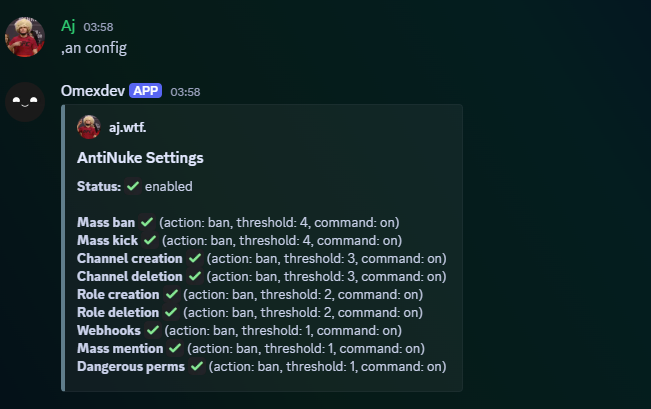
Troubleshooting
Nothing triggers
- Ensure the bot has View Audit Log
- Ensure AntiNuke is enabled:
.antinuke configuration - Ensure the specific module is enabled (shows ✅)
- Ensure the bot’s role is high enough to punish/remove roles
- Check your log channel is set properly
stripstaff doesn’t work
- Bot must have Manage Roles
- Bot’s highest role must be above the roles it is attempting to remove
mentions module doesn’t work
- Ensure Message Content intent is enabled
- Ensure the bot can read messages in the channels
- Ensure the module is enabled:
.antinuke mentions on ...
Dangerous permissions tracked in code
These permission keys are treated as “dangerous”:| Dangerous Permission Keys |
|---|
administrator |
manage_guild |
manage_roles |
manage_channels |
manage_webhooks |
ban_members |
kick_members |
mention_everyone |
moderate_members |
manage_nicknames |